What This Windows AI Assistant Actually Does
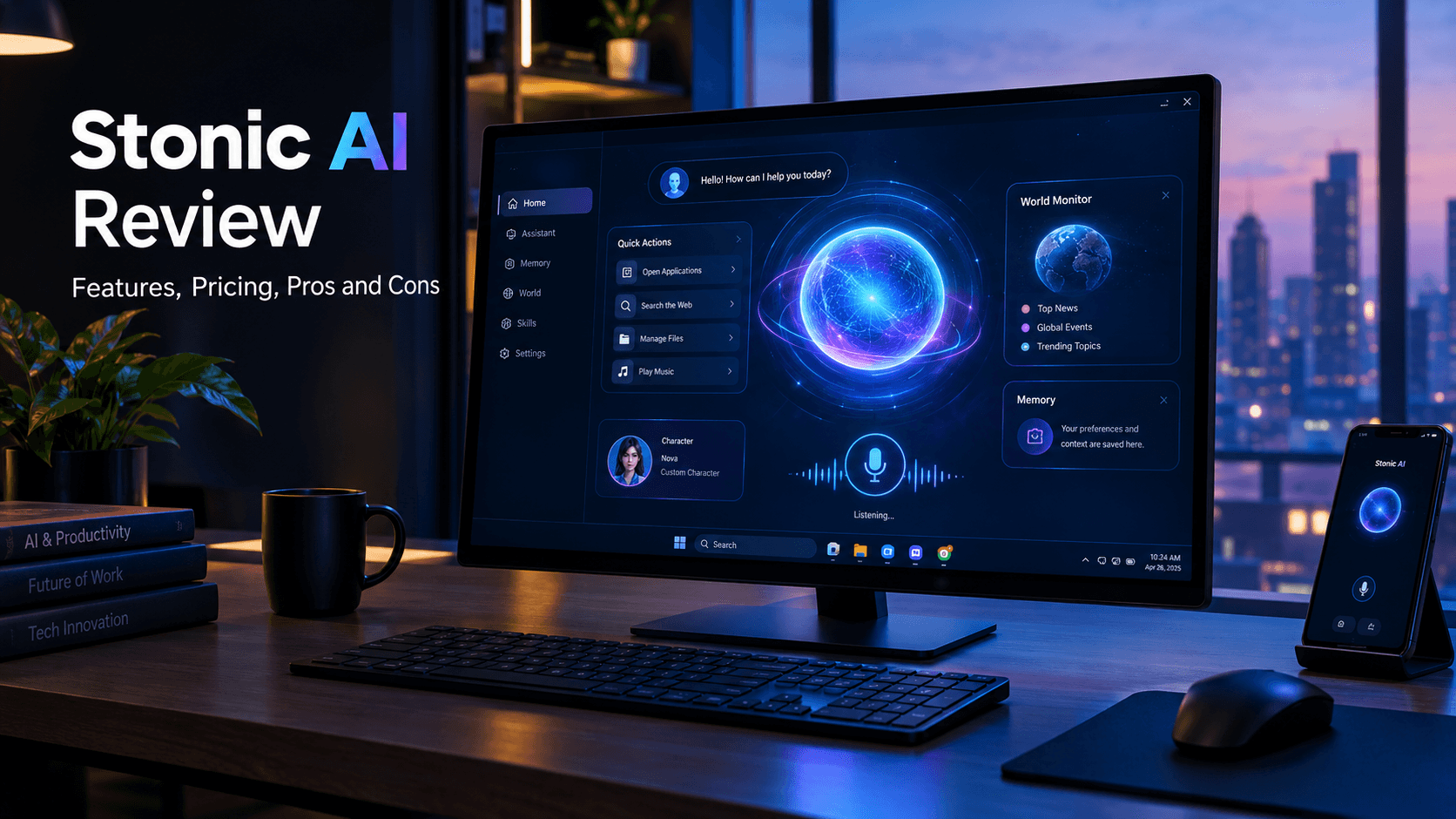
Stonic AI Review (2026): Features, Pricing, Pros and Cons
Most AI assistants are good at talking. Getting them to do something on your computer is a different challenge.
Stonic AI takes a more visual, voice-driven approach. Built for Windows PCs, it combines a cinematic desktop interface with an AI character that can talk with you, remember information, and help with everyday computer tasks. It is designed to make your desktop feel more like a sci-fi assistant than a traditional chatbot.
But is Stonic AI useful beyond its futuristic appearance? How much does it cost, what can it actually do, and is it the right tool for you?
In this Stonic AI review, we'll examine its features, pricing, privacy considerations, limitations, and alternatives so you can decide whether it deserves a place on your PC.
Quick verdict: Stonic AI is worth considering if you want a voice-driven, cinematic AI assistant for your Windows computer. Its appeal lies in its interface, personality, and everyday PC assistance. However, it is not designed to replace a professional productivity assistant or a dedicated business-automation platform. Monthly plans start at $19, and a Generation 3 lifetime licence costs $56 upfront using your own AI API keys. Prices and terms should be checked before purchase.
What Is Stonic AI?
Stonic AI is a desktop AI assistant designed for Windows 10 and Windows 11. Rather than operating only inside a conventional chat window, it presents an animated, particle-based character that users can interact with through voice and other controls.
The experience is built around four main elements:
- Voice: Talk to the assistant using natural language.
- Memory: Let it retain selected information about you and your preferences.
- Character: Choose or customize the personality you interact with.
- Skills: Access supported actions and everyday assistance on your computer.
The visual design is one of Stonic AI's defining features. Its glowing central character, animated interface, and futuristic panels are intended to create the feeling of interacting with a fictional computer assistant.
Stonic AI is developed by a solo founder in Pakistan, according to the company's terms. That makes it an independent software product rather than a tool from a large technology company.
That distinction is worth keeping in mind when evaluating support, future development, and the level of independent testing available.
The key distinction: Stonic AI is primarily an interactive desktop experience with AI assistance. If you need a tool to automate complex business processes, handle bulk work, or run unattended workflows, do not assume it is built for those jobs.
Official website: https://stonicai.com/

Stonic AI Features
Stonic AI combines voice interaction, a customizable character, memory, and everyday PC assistance. Here is what its main features are intended to offer.
1. Voice-Controlled AI Assistant
Voice interaction is central to the Stonic AI experience.
Instead of relying entirely on typed prompts, you can speak to the assistant and ask questions or request supported actions. The company describes the interface as a way to interact with your computer more naturally.
For example, you might ask the assistant to open an application, look something up, or help with a simple computer task.
The important limitation is that natural-language interaction does not guarantee that every request will work. Results depend on the supported capability, the task, and the software's ability to interpret your instruction correctly.
2. Everyday Desktop Assistance
Stonic AI is designed to help with everyday activities on your PC.
The company's examples include opening applications, interacting with a browser, playing music, organizing files, and checking which applications are consuming system resources.
These capabilities could make routine computer interactions more convenient, especially if you prefer speaking instead of switching between windows and typing commands.
However, there is a difference between handling a simple desktop action and reliably executing a complex sequence of operations.
Do not assume Stonic AI can safely process hundreds of files, execute lengthy unattended tasks, or manage an entire business workflow. Its published terms explicitly distinguish it from a bulk-task or business-automation tool.
3. A Customizable AI Character
Stonic AI places unusual emphasis on the personality of the assistant.
Its interface supports different character styles, including JARVIS-inspired and mentor-like personalities, as well as customization options.
This makes the product feel different from a conventional chatbot. Instead of interacting with a plain text box, you interact with a visual character designed to give the desktop a more personal feel.
For users who enjoy sci-fi interfaces, this may be a major attraction. For people who care primarily about completing work as quickly as possible, it may matter much less.
4. Memory and Personalization
The product includes a memory concept intended to retain selected details about the user, preferences, and ongoing context.
Memory can make an assistant feel more personalized because you may not need to repeat the same information in every interaction.
Before storing anything sensitive, however, review how the feature works, what information is retained, and how to manage or remove it. Memory is useful only when users understand what is being remembered and have appropriate control over it.
5. World Monitor and News Interface
The official website also showcases a World Monitor feature with a 3D globe, a 2D map, event hotspots, and a feed of current headlines.
This adds a command-center aesthetic to the desktop and brings visual information into the same interface as the assistant.
Treat this as an additional interface feature rather than proof that Stonic AI provides comprehensive intelligence analysis or independently verifies breaking news. Important information should still be checked against reliable sources.
6. Stonic Remote
Stonic Remote is designed to let users continue interacting with their assistant from a phone while their PC is running and Stonic is open and signed in.
According to the official setup instructions, the feature involves opening its settings and scanning a QR code with a phone.
This can be convenient if you want to continue a conversation away from your desk. However, it is not the same as having a fully independent mobile application that operates regardless of your PC's status.
Check the current requirements before relying on it.
Stonic AI Pricing: How Much Does It Cost?
Stonic AI offers a choice between monthly cloud plans and a one-time Generation 3 licence.
The official pricing pages currently list the following options.
| Plan | Price | Main distinction | |---|---:|---| | Basic | $19/month | Cloud AI, one active device, base usage allowance | | Power | $49/month | Cloud AI, three active devices, approximately 3.5 times the Basic usage allowance | | Lifetime — Generation 3 | $56 one-time | Use your own AI API keys; includes the first month of Basic |
Source: Official Stonic AI pricing and terms and conditions.
Basic — $19 per month
Basic is the entry-level cloud subscription.
The AI runs on Stonic's servers, so you do not need to create your own AI API key or configure separate AI-provider billing. The plan includes one active device and a daily and monthly usage allowance.
This is the simpler option if you want to try the product without managing API credentials.
Power — $49 per month
Power includes the same feature set, with a higher usage allowance and support for three active devices.
The company describes the allowance as approximately 3.5 times that of Basic. Actual consumption depends on how demanding your tasks are, so the advertised multiplier should not be interpreted as a fixed number of requests.
For a casual user on one PC, Power may offer little additional value unless the higher usage limit is genuinely needed.
Lifetime — $56 one-time
The lifetime option works differently from the monthly plans.
You pay once for the Generation 3 licence and use your own supported AI-provider API keys. The AI provider bills you separately for usage, so the $56 purchase price does not mean unlimited AI usage at no additional cost.
The licence covers Generation 3 and its updates under the published terms. A future generation may be sold separately.
The offer also includes the first month of Stonic Cloud Basic, subject to the company's terms.
Is Stonic AI worth the price?
That depends on why you want it.
- Choose Basic if you want the full experience without managing API keys and expect to use it on one computer.
- Consider Power if you genuinely need the higher allowance or multiple active devices.
- Consider Lifetime if you prefer a one-time licence and understand how API keys and provider billing work.
If you only want an AI tool for writing, research, coding, or professional work, compare Stonic AI with general-purpose assistants before paying. Its own terms say it is not intended to replace tools such as ChatGPT or Claude for professional work.
Also review usage limits, cancellation conditions, and the refund policy before buying.
Is Stonic AI Safe and Private?
Privacy deserves particular attention when an assistant interacts with your computer.
Stonic AI's website describes its approach as local processing for certain desktop data. Its published explanation says files and screen content remain on the PC, while commands or questions may be sent to the company's servers so the AI can respond.
That distinction matters: local handling of files does not automatically mean the entire AI service operates offline.
The company's privacy claims should be read alongside its official privacy policy and terms. I have not independently audited its application, network traffic, storage systems, or security controls, so I cannot certify that the product is safe for sensitive work.
Before using any desktop agent, consider these precautions:
- Test it with non-sensitive files first.
- Review permissions and the actions it can perform.
- Avoid sharing passwords, financial records, confidential client files, or other sensitive information until you understand its data handling.
- Check how memory and conversation data are stored and deleted.
- Verify important actions yourself rather than assuming the assistant completed them correctly.
A polished interface and an [AI-powered](https://https://abdulqayyum.me/blog/how-i-built-my-portfolio-nextjs-15-typescript-prisma-pwa) workflow are not substitutes for independent security testing.
If you plan to use Stonic AI on a work computer, review your organization's security requirements before installing it.
Stonic AI Pros and Cons
Pros
- Distinctive interface: A cinematic, animated character makes the desktop experience stand out.
- Voice interaction: Offers a more conversational way to interact with a PC.
- Personalization: Character and memory features aim to make interactions feel more personal.
- Everyday assistance: Supports selected computer tasks rather than limiting the experience to text conversations.
- Flexible pricing: Offers both monthly cloud subscriptions and a one-time licence.
- No API key on monthly plans: The cloud subscription handles AI access without separate provider setup.
Cons
- Windows-focused: The official product is built for Windows 10 and Windows 11.
- Recurring costs: The cloud plans cost $19 or $49 per month.
- Separate API costs on Lifetime: Your chosen provider may charge additional usage fees.
- Usage limits: Monthly subscriptions include daily and monthly allowances.
- Not a business-automation platform: The company's own terms exclude bulk tasks, business workflows, and long unattended jobs from the product's intended use.
- Limited independent verification: I have not independently tested its claims or completed a security audit.
- Aesthetic may outweigh utility for some users: The futuristic interface is a selling point, but it does not by itself prove that the assistant will save time.
Stonic AI vs ChatGPT and Microsoft Copilot
Stonic AI, ChatGPT, and Microsoft Copilot overlap in some areas, but they are not identical products.
| Category | Stonic AI | ChatGPT | Microsoft Copilot | |---|---|---|---| | Main appeal | Character-based desktop AI experience | General-purpose AI assistant | Microsoft's AI assistant experience | | Voice interaction | Central to the experience | Available in supported experiences | Available in supported experiences | | Desktop integration | Designed around everyday PC assistance | Depends on the app and available tools | Varies by product and Windows integration | | Personality and visual interface | A major focus | Primarily assistant-focused | Microsoft product experience | | Pricing model | $19/month, $49/month, or $56 lifetime licence with separate API costs | Varies by plan | Varies by product and plan | | Best suited to | Users who want a cinematic, voice-driven PC companion | Writing, research, learning, coding, and general AI assistance | Users who want Microsoft's AI features and integrations |
This is a high-level comparison, not a benchmark test. Features, pricing, and availability can change, and the products should not be treated as interchangeable.
If your main goal is writing articles, learning programming, researching topics, or solving technical problems, a general-purpose assistant is likely the better starting point.
If you specifically want a character-based interface and voice-driven interaction with your Windows desktop, Stonic AI offers a more specialized experience.
Who Should Use Stonic AI?
Good fit: Sci-fi and desktop-interface enthusiasts
If you enjoy futuristic interfaces and want your PC to feel more interactive, Stonic AI's design and customizable character may appeal to you.
Possible fit: Users who prefer voice interaction
People who prefer speaking to their computer may appreciate its voice-driven approach, provided the supported commands fit their needs.
Possible fit: Casual users who want everyday PC assistance
Opening applications, looking up information, and handling supported everyday actions can be convenient. Start with simple tasks and judge the results yourself.
Poor fit: Professionals who need dependable business automation
If your requirement is processing thousands of records, managing complex workflows, or running unattended tasks, look for a purpose-built automation solution. Stonic AI's published terms explicitly say it is not designed for those use cases.
Poor fit: Users who need an entirely offline assistant
Do not choose Stonic AI on the assumption that every AI operation happens locally. Check the privacy policy and service requirements first.
How to Get Started with Stonic AI
If you decide to try Stonic AI, follow these steps:
- Visit the official Stonic AI website.
- Review the current plans and decide whether you prefer cloud access or the lifetime licence.
- Download the Windows installer from the official download page.
- Install the application and follow its setup instructions.
- Configure voice and other preferences.
- Start with a simple, low-risk request and check the result.
- Review the available privacy settings, memory controls, usage allowance, and account options before using it regularly.
The installer is advertised as free to download, but a paid plan is required to use the service. Confirm the current requirements on the official website before installing.
Frequently Asked Questions
What is Stonic AI?
Stonic AI is a Windows desktop AI assistant built around voice interaction, a customizable AI character, memory, and everyday computer assistance.
How much does Stonic AI cost?
The current official prices are $19 per month for Basic, $49 per month for Power, and $56 as a one-time purchase for the Generation 3 lifetime licence. Lifetime use requires your own AI API keys after the included first month of Basic, and provider charges may apply.
Is Stonic AI free?
The installer is free to download, but the company says a paid plan is required to use the product. Downloading the software should not be confused with receiving free ongoing AI access.
Does Stonic AI work on Mac or Linux?
The official product is presented as a Windows application for Windows 10 and Windows 11. Check the current download page for supported operating systems rather than assuming that a Mac or Linux version is available.
Does Stonic AI need an API key?
Not on the monthly cloud plans. Stonic runs the AI on its servers. The Generation 3 lifetime licence uses your own supported AI-provider keys, which may incur separate usage charges.
Is Stonic AI safe to use?
I cannot certify its security without independent testing. The company describes local handling of certain files and screen data, but AI commands or questions may be sent to its servers. Read the privacy policy and test the software with non-sensitive data before relying on it.
Can Stonic AI automate business workflows?
Stonic AI can help with selected everyday PC actions, but its published terms say it is not intended for bulk tasks, business workflows, or long unattended jobs. For dependable business automation, evaluate a dedicated tool instead.
Is Stonic AI better than ChatGPT?
Neither is universally better. Stonic AI focuses on a cinematic desktop companion and voice-driven PC interaction. ChatGPT is a general-purpose assistant suited to a wider range of writing, research, learning, coding, and problem-solving tasks.
Final Verdict: Is Stonic AI Worth Trying?
Stonic AI has a distinctive proposition: a voice-driven AI character that makes your Windows desktop feel more like a sci-fi command center.
Its strongest appeal is the combination of personality, visual design, memory, and everyday computer assistance. The flexible pricing options may also suit people who want to choose between cloud access and a one-time licence.
But the limitations matter. The monthly plans have usage allowances, the lifetime option requires your own API keys, and the product is not intended to replace professional AI assistants or business-automation systems. Its privacy and security claims also deserve careful review rather than blind trust.
My recommendation: Try Stonic AI if you specifically want its desktop experience and voice interaction. Start with simple tasks, verify its behavior, and compare the available plans before committing. If your priority is getting serious work done—writing, coding, research, or complex automation—choose a tool built around those requirements.
For readers exploring practical AI tools and workflow improvements, see [INTERNAL LINK: your AI tools or automation article] or [INTERNAL LINK: your relevant services page].
Editorial note: Product features, pricing, and policies can change. This article distinguishes official product information from independent testing; claims about hands-on performance should only be added after testing the application directly.